Showing posts with label Mesh_Comparison. Show all posts

Tuesday, July 29, 2014

Mesh Comparison - Javascript & ASP.NET service

Web page for mesh comparison

Pure JS, client-side scripting
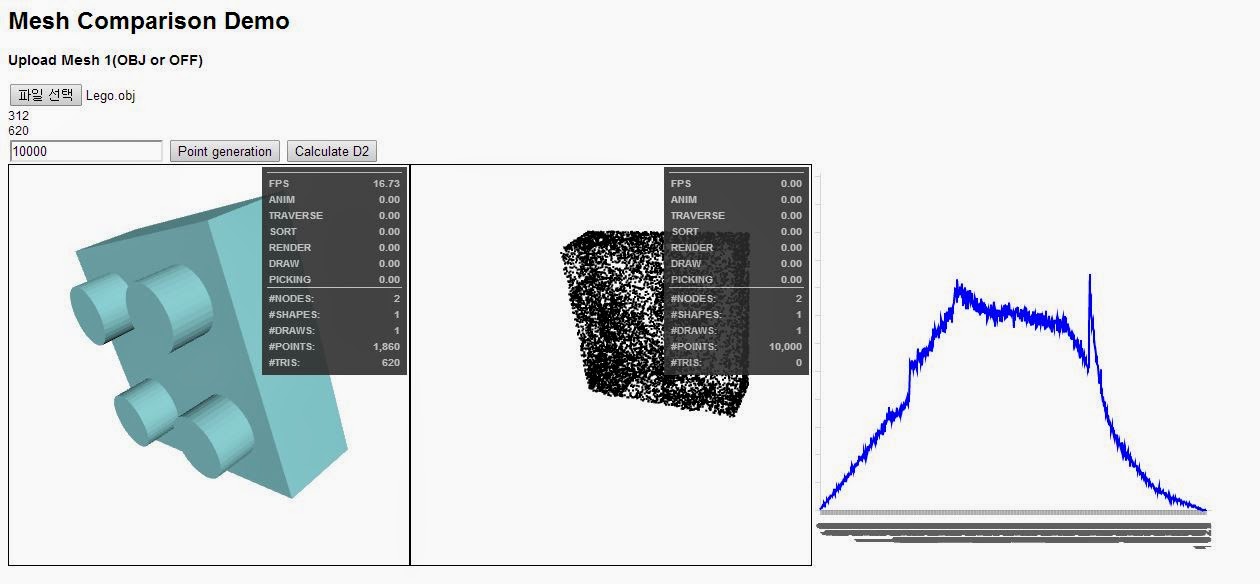
  • For the interactive servicing of mesh comparison(or retrieval), I made the web page for it using X3DOM for visualization and JS for calculation.
  • It was pretty successful, and you can see the result in the below link.
  • You can test with your OBJ or OFF mesh data or,
  • You can download sample model from here.
  • http://ssong.kaist.ac.kr/upload_test.html
  • (OBJ and OFF parser may have some limitation.)
Using ASP.NET
  • Soon, I realize that the client-side scripting is not enough for maintaining DB for mesh data, and shape descriptors.
  • I'm not familiar with the various web technologies and choose a server-side programming method that I can develop fast-ASP.NET
  • First step is develop the calculation module with C# DLL, which is just a conversion task from JS.
  • Second step is designing the layout, which I'm not good at, and connecting the module with elements in the page.
  • Also, one functionality added is storing the uploaded mesh data into server machine for later development.
  • For dynamic visualization of X3DOM, "HTMLGenericControl" of ASP.NET was used to change the attribute value in X3D node.(Is there any performance issue?)
  • You can test with your OBJ of OFF mesh data, but you should keep in mind that the DATA YOU UPLOADED WILL BE STORED IN MY SERVER MACHINE.
  • (OBJ and OFF parser may have some limitation.)
  • http://143.248.54.5:1234/default.aspx

Further Issues

In development
  • The postback harms the UX...
  • Performance itself seems worse than JS
  • Hopefully, I will solve the problems by modifying the structures.
  • Model DB displaying, selection and retrieval.
In methodology
  • I didn't clearly understand the Histogram --> PDF part yet.
  • Several approaches on normalization, bin width selection and PDF comparing.

Friday, July 18, 2014

Mesh Comparison - Day 4

Hello World DSME-(Histogram-based) Qualitative Mesh Comparison in between ship CAD systems.

%-------------------------------------------------------------------------------

Goal : Develop the module for 3D mesh comparison, in ACIS environment

Todo :


  1. Study
  • Qualitative shape (search, detection, matching, comparison, ...)
  • MeshLab(VCG) or OpenMesh library
  • ACIS & HOOPS
    2. Implementation
  • Meshing(Solid, B-rep to facet data)
  • Sampling on mesh surface
  • Shape Distributions
%-------------------------------------------------------------------------------

Sampling on mesh surface

  • Be aware, that weighted random number generation based on the binary search, can cause the memory problem.
  • In our case, sampling from the model has 15,725 faces are crashed when we pick a random face with binary search.
  • So instead of the binary search, we use C++ random library, which has weighted random number generation.(LINK)
  • Interval = [1,number of faces], and weight is the area for each face.

Shape Distributions

  • "Shape Distributions"
  • From sampled points, pick N pair of points and calculate D2 distance(Euclidean).
  • The distance values are stored in B number of bins, and the number of distance is calculated.
  • Interval of each bin = (max_distance-min_distance)/B


(※The 3D model only works when you see this post separately with Day-3+, by clicking the title of this post)

You can see the difference of first and second model.
First model is more simplified one.

And follow is the corresponding histogram of these two.


Overall shape is similar but there's differences, the metric distance of these two histogram will be implemented later.

For instance, another completely different model and corresponding histogram shows different shape of histogram.


Wednesday, July 16, 2014

Mesh_Comparison - Day 3+

Hello World

HTML5 Interactive

You can see the results in previous post interactively, by X3DOM.
Wheel click + drag : panning
Left button click + drag : rotating
Right button click + drag : zooming